Showing posts with label widgets. Show all posts

Sunday, April 24, 2011

BLOGGER BLIPS - GOOD NEWS, BAD NEWS

Copyright DaisyM at DeviantArt

Good news - just a very quick post to update you all ... the 'Older Posts' buttons or text that we have personalised now look to be working perfectly again. Which definitely beats having to change templates then lose all our tweaks.

And I actually managed to leave a comment today! So I'm hopeful that's back to normal as well.

So it looks like normal service is finally being resumed.

Copyright Thomas Krauss at Deviant Art
The bad news is: I still don't have my 'Follow' button at the top toolbar of the blog, or the 'New Post' button or the quick edit icon.

Problems loading pictures to your posts?

I've found that clicking on the upload photo is not working every time. Sometimes it does - and there's the picture on the blog post. Other times, it flashes and the picture disappears from the add picture folder, then reappears with the blue outline - and clicking a second time sometimes works ... or not.

If this is happening to you, try double-clicking on the image you want to add. I've found this works for me, and the picture goes straight into the blog post.

Hope this helps - you know I'll keep you updated!

Friday, October 29, 2010

SCARY PINK SATURDAY - HAPPY HALLOWEEN!

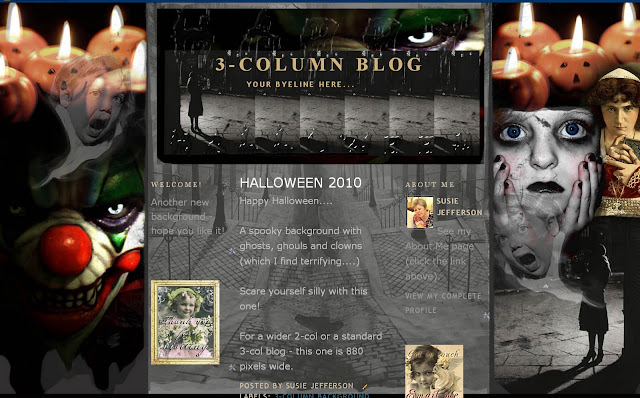
This weekend is Halloween - so it's a Scary Pink Saturday post - a new background, header and blinkie for all you horror fans!


My inspiration: dark, lonely street (probably raining just a little). No moon. Total silence, no passers-by... just the sound of footsteps... Do you hear an echo?....

BACKGROUND

HALLOWEEN 2010 - Copyright Susie Jefferson
 Copy all the code below, exactly as you see it, and insert into an html box right into your sidebar or footer. This one will also work with the new Templates AND WordPress (depending on your template, of course. I know it works with WP's Bueno). This background is 880 pixels wide, so will fit standard 3-col blogs and wider 2-col blogs.
<style type="text/css">
body {background-image: url("http://i659.photobucket.com/albums/uu313/1stFloorFlatComputery/8c29da51.jpg"); background-position: center; background-repeat: no-repeat; background-attachment: fixed; }
</style>
<div id="tag" style="position:absolute; left:0px; top:50px; z-index:50; width:150px; height:30px;">
<a href="http://1stfloorflatblogology.blogspot.com/" target="_blank">
<img border="0" src="http://i659.photobucket.com/albums/uu313/1stFloorFlatComputery/47e6b740.jpg"/>
</a></div>
HEADER

HALLOWEEN 2010 - copyright Susie Jefferson
Copy the image code below to install, or download to your blog if you want to customise it with your own text.
http://i659.photobucket.com/albums/uu313/1stFloorFlatComputery/a82a3af7.jpg
BLINKIE

HALLOWEEN 2010 - Copyright Susie Jefferson
 This is too big for a side bar - I designed it to go in your footer section. If you desperately want a smaller one for your sidebar, email me and I'll resize it. Again, copy the image code (below) to install.
http://i659.photobucket.com/albums/uu313/1stFloorFlatComputery/a0a85f3b.gif
Scare yourselves silly with these... ghosts, ghouls, and clowns (these used to terrify me when I was a child. NOT funny... Remember 'ITl by Stephen King?)  Did you see those teeth??

pink saturday

Happy Halloween everyone...and don't forget to visit Beverly at How Sweet the Sound to see all the other wonderful Pink Saturday posts!

Sunday, October 24, 2010

TWO GREAT NEW WIDGETS TO ADD TO BLOGGER

Optical lens - copyright Susie Jefferson

I'm feeling a lot more cheerful this morning, now The Dirty Deed is done (ie: admitting defeat, throwing in the towel, wimping out, Admitting I Was Wrong, falling on my sword etc etc) and have transferred back to Blogger!

The deciding factor was finding these two great widgets, which won't add onto WordPress.com (although they will on WordPress.org if you are happy to pay for your template, pay to host it externally, have a Master's Degree in computer stuff plus the patience of a Buddhist priest...).

The first one is the great toolbar right at the bottom of this blog, by Wibiya, where you can add all the links you could possibly want (and choose the toolbar colour from around 30 options). I think it's a great idea.


The second is the gorgeous little Etsy thingie in my sidebar! Designed by Craft Cult, it's small, cute, beautifully designed.

Click on Widgets on the top toolbar, and choose from 8 really attractive (and totally different) layouts - there's sure to be one to suit you! A total MUST HAVE for any Etsy seller.

Great, huh? I'm a happy bunny again (LOVE new toys!)

Friday, May 28, 2010

GREAT FIX FOR BLURRY/SHAKY PHOTOS

 Copyright-free image from Tack-o-Rama

I get a free newsletter from one of the It sites, and found this great (free) link for you - UNSHAKE. It un-shakes and de-blurs your blurry, shaky photos and pretty much makes them decent pix again.

You'll have to experiment (just a little bit) to get the right settings, but UNshake is 100% better than deleting or throwing those photos away!

Hope this helps!

Thursday, September 10, 2009

MUSIC WIDGETS - AGAIN!

I got an email from someone asking me about the music widget controversy - she was a little disbelieving about the "you can't hear the music because of copyright issues" thing on Playlist (I'm in the UK) so here's the proof.


Copyright-free image from Tack-O-Rama

 I took the snapshot of one particular blog where the widget is at the very bottom - which is good, because it makes the blog load faster - but is bad, because my computer was frozen for the usual 3-5 minutes, and I couldn't figure out why!


Here's my original post on the subject, in case anyone reading this wants to reset their players.

Tuesday, August 18, 2009

TUTORIAL: ADD A ROLLOVER TO YOUR COMMENTS

Maybe you've noticed a little rollover when you go to leave a comment under my posts. If you did, I bet you're wondering how to do it.


Copyright-free image from Tack-o-Rama


Here's my latest Computery tutorial, how to add a rollover to the word "Comments" under your posts.

It does involve dabbling with your html, so I have done step-by-step screenshots for you.
ADDENDUM:

KBeau says:
For everyone else who is having trouble seeing it, you have to be on the blog main page where all of the posts are and not the page where only one post is. When you pass over where it says "1 comment" or "2 comments" or such, then you get a pop up box that says, "Click here to leave a comment" or something like that.
KBeau definitely explains it better than I do!

Monday, July 13, 2009

MUSIC WIDGETS SLOW DOWN YOUR BLOG

Copyright-free image from Art-e-Zine

Music – on your blog. A controversial subject…

So many people like to have music widgets on their blogs – but be careful!


These are one of the worst offenders when it comes to slowing down the loading time of your blog – which means you may well lose your more impatient readers.

In fact, PlayList has copyright issues, so will hang up a visitor’s screen (and block them from going anywhere else, or even deleting your blog) for 5 whole minutes – or more! I know this for a fact, as it keeps saying I (being from the UK) cannot view or play their (US) content. Can you imagine how frustrating this is?

HOW TO SET PLAYLIST

Sneaky Momma has a great post on this, showing exactly how to set your PlayList player to only play when people click on it – so no more hung screens, and no more getting blasted with music when you aren’t expecting it (when looking at blogs in the middle of the night because you can’t sleep etc).

I’m trying out Mixpod on my Blogger blog, and it also has a setting so that the music will only play when you WANT to hear it.

HOW TO SET MIXPOD PLAYLISTS

1. CREATE

Go to MixPod > Create New Playlist > Select Music Playlist Skins (big selection, from cute to geeky)

Click Create A Playlist and choose your music (use the + button to add the music)

2. CUSTOMISE

Click Customise – you’ll see two tabs, one is Colour (so you can customise the colour of your playlist skin) and the other one is the important one: Settings

In Settings, you’ll see 4 choices

Autoplay – click NO and the player will only play if people tell it to. This is the magic bit that speeds your blog right up, and stops hanging screens etc.

Shuffle – Again, a simple Yes or No choice. I like Shuffle myself. Or No makes the playlist play in the order you chose.

Loop – Yes or No – so do you want it to play continuously, or just play your list one time and stop.

Privacy – you can choose to keep your list private, so only people looking at your blog will see it – or you can make the list public so everyone on MixPod can see it too, and download it if they think your choices are mega-cool.

3. SAVE PLAYLIST

Give your playlist a name, and click on up to 3 boxes to categorise it (Latin, Soundtracks, Dance etc etc) and also tag it if you wish (moody music, breakup etc etc)

4. SAVE

Click the green Get The Code Button. This takes you to a page where you select your format (Facebook, Bebo etc) and you’ll see the embed code in the box (or you can choose to Post To Another Site, ie: straight to your blog etc, which is the one to choose for WordPress).

If choosing the embed code (you’ll create your own html box to put it in) you need to right-click and select Save All – this saves scrolling! Then paste the code into the box (HTML/JavaCode box on Blogger).

You’re done!

So be nice folks, and set your playlists NOT to play unless people want to listen to them.