Showing posts with label music. Show all posts

Friday, February 4, 2011

MIXPOD - MUSIC WIDGET PLACEMENT

Copyright Tack-o-Rama
Kit contacted me, asking how to wordwrap around a MixPod widget.

So I thought this would make an excellent tutorial, in case anyone else would like to know. The advantage of MixPod from my point of view is that the widget can be set to play only when clicked on (which is only polite, as others might not like my taste in music) and also doesn't slow my blog down.

Unfortunately PlayList does - it's really irritating that it completely freezes my computer, only to say that due to copyright issues, the music can't be played in my country (UK). As I surf with the sound OFF anyway (computer in living room + football on television = screaming husband, lol) it's doubly irritating!

So here's how I do it:

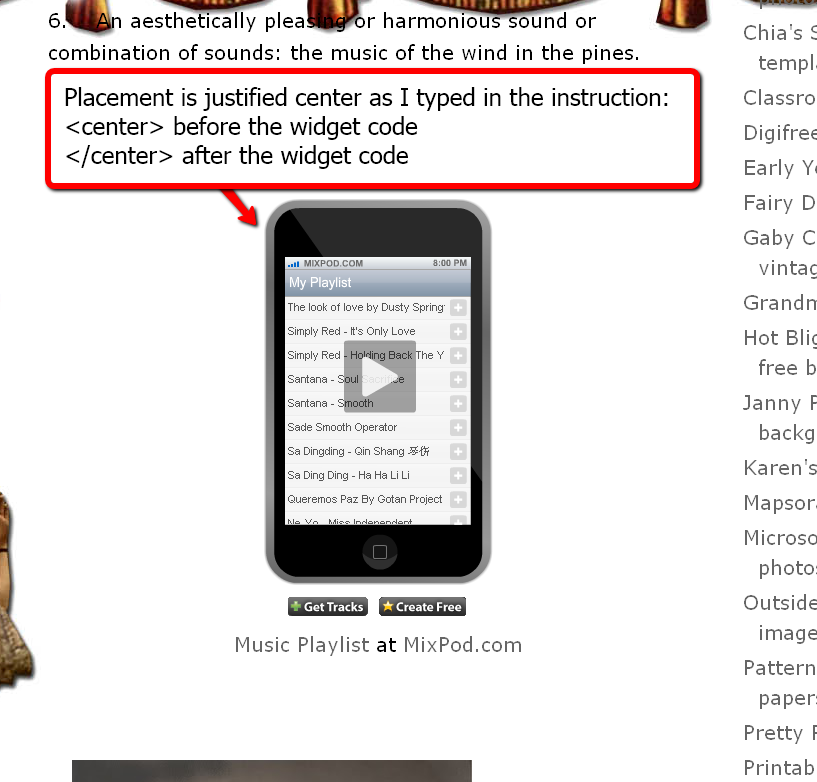
In this post, I give the basics of how to add your own MixPod player. You'll see I've got the widget in the centre of a post, and on my Music page, I've got one on the left and one in the centre.

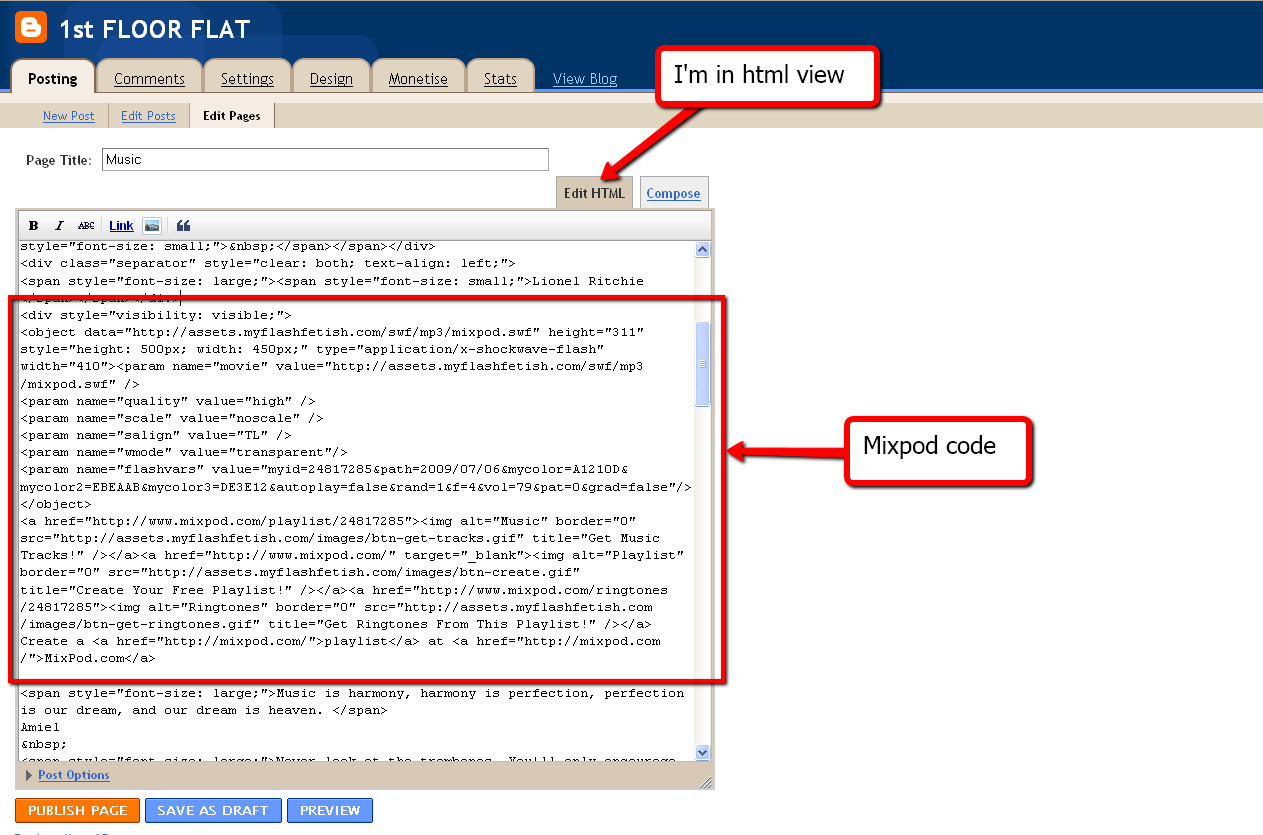
I simply entered the link from Mixpod into the middle of the post, where I wanted it to appear. To do this, I entered the code with the posting area in HTML view (click on the tab just at the top of the posting box).

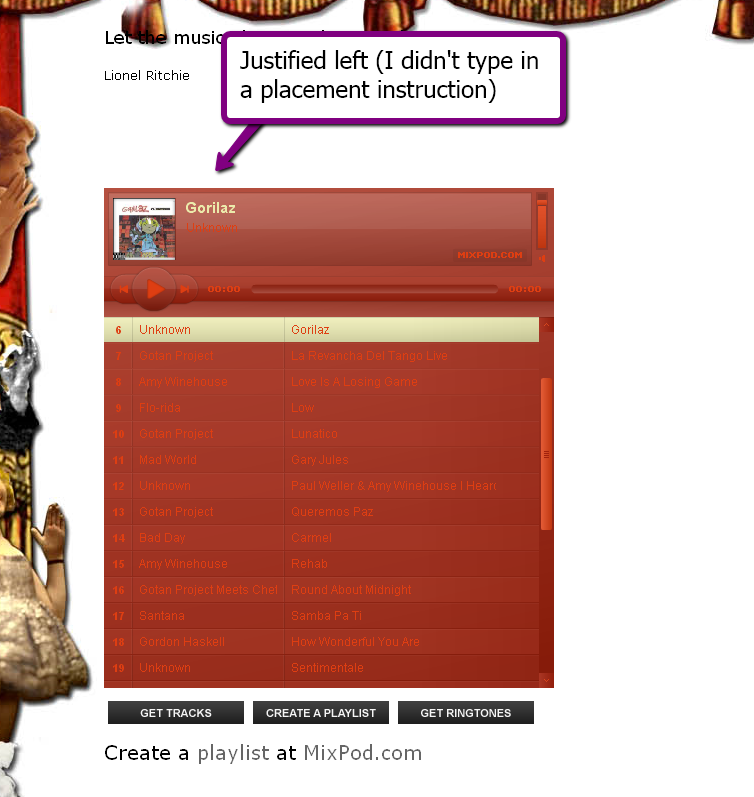
Where I didn't type in a placement instruction, the widget has automatically justified left as that is the default for my text.


Where I did type in an instruction, this goes at the start and at the end of the widget code.


These html instructions go in pairs, so you have to open the instruction with the first part of the code, ie: <center> and then close it: </center>.


The closing instruction is always a / and then the repeat, eg: <b> and </b> (this is the instruction to make a piece of text bold, ie: <b> this is bold </b>

I hope this makes sense?

I don't know of any way you can wordwrap either side of the widget, as this would interfere with the html code of the widget itself, so I think you'll have to be satisfied with having text above and below the mixpod player. But at least you can have it in a post, if you don't want the player in an html box in your footer or  the sidebar!

If you want to reposition the player, you do need to cut&paste. I also strongly advise you don't set this to play automatically, or people could be scrolling through forever, trying to find the post to turn it off.

Email me if you have any problems.

Friday, December 17, 2010

PINK SATURDAY - ON THE 4TH WEEK OF CHRISTMAS...

It's the 4th week of Christmas! I'm so excited - I love, love, love Christmas and all the hustle and bustle in the run-up to the Big Day. 

SILENT SNOW - copyright Susie Jefferson
Here in London we had a freak snowstorm - all clear around 10.00am - then I forced myself away from the computer to make a coffee, looked out the window, and voila! About 2 inches of snow! (the computer is nowhere near a window, and I simply didn't notice).

Hence this wintry background, using two wonderful photographs (with permission) by Jamie at Art-e-ology.

If you'd like to use my background, just copy all the code below and insert into an html widget right in your blog. This one is 950px and suitable for a 3-column blog, a wide 2-colum blog, the new Designer templates and also some of the freebie WordPress ones (eg: Bueno).
<style type="text/css">
body {background-image: url("http://i659.photobucket.com/albums/uu313/1stFloorFlatComputery/3a1ed415.jpg"); background-position: center; background-repeat: no-repeat; background-attachment: fixed; }
</style>
<div id="tag" style="position:absolute; left:0px; top:50px; z-index:50; width:150px; height:30px;">
<a href="http://1stfloorflatblogology.blogspot.com/" target="_blank">
<img border="0" src="http://i659.photobucket.com/albums/uu313/1stFloorFlatComputery/9061ddc2.png"/>
</a></div>
HEADER
SILENT SNOW png image - copyright Susie Jefferson
http://i659.photobucket.com/albums/uu313/1stFloorFlatComputery/9da4bad8.png
The header is a png file as it has a transparent background with a drop shadow, so for best results use the code below rather than left-click for the full size, and right-click to copy to your computer. If you want to add your own text, download the png and add text using your favourite graphics programme. MERGE the layers (don't flatten) and save as a png before reloading, or you'll end up with a white background instead of a transparent one.

EMAIL BUTTON
Here's a seasonal email button I made - and here's the post with full instructions on how to add your own address etc.

PINK SATURDAY - CHRISTMAS MUSIC

This week on Pink Saturday, the theme is Christmas music. I have so many favourites, it's impossible to choose just one... Click on 'play' if you'd like to hear the music.


MusicPlaylist
Music Playlist at MixPod.com


pink saturday

Finally, please visit Beverly at How Sweet the Sound to see all the other wonderful Pink Saturday posts!

Sunday, October 10, 2010

MAD WORLD

Do you ever have a song playing in your head... you keep hearing it played everywhere, but can't find out the name of it? 'Mad World' is one of those songs for me.


One of my favourite songs - ever - is 'Mad World' by Tears for Fears, performed by Gary Jules for the film 'Donnie Darko'.


Last night, on the UK version of X Factor, I saw an amazing performance by Aiden Grimshaw.


For once, I agree with Simon Cowell, who said this performance and one other absolutley blew him away: the other one 'being on the American show' - which of course is American Idol.


And of course that other performance was by Adam Lambert.

It's it wonderful to be able to compare these. Of course, there is no comparison - I love them all - but what a different and individual interpretation each of them has given to this song.


Here's the original live performance by Tears for Fears on Top of the Pops (BBC) way back in 1982- it was actually fairly upbeat and rather cheery!

Hope you enjoyed them!

Saturday, October 9, 2010

IT'S A MAN'S MAN'S MAN'S WORLD

'It's a Man's, Man's, Man's World' is a song that makes all the hairs on my neck stand up: I get shivers - it's one that when I hear it, I just can't get out of my head. I love, love, love it.


So you can imagine I was very excited to hear it on tonight's X Factor show. Here's Mary Byrne singing it.


Did you know James Brown wrote it?


This version is by Millabone, who has added some amazing visuals to the soundtrack.


And here's the great James Brown live - phenomenal!

Compare and contrast...

Thursday, September 10, 2009

MUSIC WIDGETS - AGAIN!

I got an email from someone asking me about the music widget controversy - she was a little disbelieving about the "you can't hear the music because of copyright issues" thing on Playlist (I'm in the UK) so here's the proof.


Copyright-free image from Tack-O-Rama

 I took the snapshot of one particular blog where the widget is at the very bottom - which is good, because it makes the blog load faster - but is bad, because my computer was frozen for the usual 3-5 minutes, and I couldn't figure out why!


Here's my original post on the subject, in case anyone reading this wants to reset their players.

Saturday, August 15, 2009

PINK SATURDAY - SPEED UP YOUR BLOG


I decided to do something different this Saturday!


Never mind the cute stuff, lol... what can I give you that will (hopefully) improve your life and enrich your blogging experience?


Pink Saturdays are all about celebrating the colour PINK, and to me Pink-ness is also a state of mind: happy, serene...

I'm always up for visiting other blogs, and with so many Pink Saturday members it's becoming quite daunting, so I take it in sections. Beverly lists the blogs in blocks of 10, so I deal with one block at a time and generally zip along happily. Sometimes I start from the top down, or the bottom up, or close my eyes and jab my finger on the screen...

Q: Do I need to speed up my blog loading time?
A: Check out this
Stopwatch link and find out!

Nobody wants a slow-loading blog - especially for those still on dial-up. You can lose a lot of readers this way. So what can you do to speed things up? These are the two main culprits:

BLOG BACKGROUNDS

Do you have a blog skin (a CSS sheet) loaded to prettify and bling up your blog? Did you know that if you load this at the BOTTOM of your blog it will help your blog to load faster?


Go to Layout > Page Element and scroll down to the very bottom of the page, and you'll see a box saying Add A Gadget, just like your usual sidebars. Drag&drop your blog background there, and it'll look exactly the same - but load a lot faster!

MUSIC WIDGETS

These can really slow your blog down.

If you didn't see it before, here's my previous post about it and how to fix this.

PlayList now blocks anyone not based in the US from hearing their music due to copyright issues. This means anyone with PlayList music set to play automatically on their blog will freeze up those computers! For me (in the UK) this means my entire computer is locked down for over 5 minutes (and I'm on 8-meg broadband) and if they have their comments set to appear on the page below the post, that's another 5 minutes or so of very frustrating frozen-screen time! And there's nothing you can do - you can't go to another page, exit the computer, nothing! (I usually scream quietly, then go and make a cup of tea...)

Mixpod doesn't block people from hearing the music, but autoplay still holds the blog up until the widget has stopped loading. Which still slows things down - and people have tried to fix this by putting the widget low down on the sidebar, or at the bottom of the blog (as I recommend for your blog backgrounds). If set to autoplay, this means frantic scrolling to turn the music OFF if you don't want it.

Don't forget - everyone may not have your taste in music, or may (like me) have the computer in the front room... and woe betide me if there's a loud blast of sound when Himself is watching football, or gold, or motor racing, or tennis...

MAKE VISITING YOUR BLOG AN EVEN NICER EXPERIENCE

We all love visitors! We all love to get comments (it's awful to think we're all bloggin away, and nobody is reading our posts) so how can we make our blogs a nicer place to visit?

COMMENT MODERATION & CAPTCHA

We all hate spammers - so many people set their Comments for a Captcha image (which can sometimes be so difficult to read that you're going through three or more before the blog will accept your comment).


On Blogger, go to Settings > Comments and scroll down to Comment Moderation.

Set this to Always and then there is no need for Word Verification (Captcha) as nobody can get a comment past you without you seeing it first!

Don't forget to put your email address in the box below, so non-Google members' comments can still be moderated by you - and also the Comment Moderation box.

So there are two places where you need to put that email address - it doesn't have to be your private email address. You can create an email address with Google, Hotmail or Yahoo and keep it just for your comments! Blogger allows you up to 10 email addresses.

I also notice on some blogs: they have the Word Verification, but don't moderate, so the comment goes straight onto their blog. Word Verification (Captcha) alone doesn't stop spammers! They'll type the image in and still post their rubbish. I do see a few blogs were it says Author has removed comment - so you can see that a comment had to be removed, for whatever reason. Better to stop the comment BEFORE it gets published! ALWAYS tick that Always Moderation box.

COLOUR

If your blog has a dark background, your text needs to be a lighter colour so that people can read it. White can be very hard on the eyes, so go for a pale grey or a cream.

SIZE


Make your text a readable size.

It doesn't have to be huge (you can choose several sizes, eg: small, normal, large etc). If you look in Layouts > Fonts & Colours, you'll see two controls to the right - click Larger until you are happy (you'll see your blog on the split screen underneath).

AVOID LIKE THE PLAGUE

Please don't centre your text - it really irritates in a long post. Keep it for headers or quotations. Avoid italics except for emphasis - again, it's hard to read. The worst thing you can do to your readers, especially anyone over 40, is to have centred, italic text in a strobing colour (pink, light green, turquoise, yellow).

PARAGRAPHS

Keep paragraphs short and sweet. Long blocks of text are harder to read, and your eyes tend to skim sections and miss a lot of what you have to say.

ADDING PICTURES

This can be really frustrating! In Blogger, all your pictures load at the top of the post. The best way to postion them is to cut&paste into your post, and this can mean a lot of juggling around (Publish Post, edit, publish again, etc).

For two pictures you want to appear exactly underneath each other, try this bit of code:
<div style="clear: both;"gt;</div>


You'll need to enter it into the html, so click the Edit Html tab at the top of your post box. If you have a bit of text next to your first picture, eg: This is Fred, then enter the code right after the word "Fred". If you only have the picture, you'll see a whole load of code ending in </a></span> so put it after that. (Any problems, email me!)

I hope this all helps!

I'll add another post as I think of more things. I'm sure this is enough for now, and you're thinking about a nice cup of tea and a medicinal biscuit or three.



Go here to visit Beverly at How Sweet The Sound and to see all the other Pink Saturday posts!
Monday, July 13, 2009

MUSIC WIDGETS SLOW DOWN YOUR BLOG

Copyright-free image from Art-e-Zine

Music – on your blog. A controversial subject…

So many people like to have music widgets on their blogs – but be careful!


These are one of the worst offenders when it comes to slowing down the loading time of your blog – which means you may well lose your more impatient readers.

In fact, PlayList has copyright issues, so will hang up a visitor’s screen (and block them from going anywhere else, or even deleting your blog) for 5 whole minutes – or more! I know this for a fact, as it keeps saying I (being from the UK) cannot view or play their (US) content. Can you imagine how frustrating this is?

HOW TO SET PLAYLIST

Sneaky Momma has a great post on this, showing exactly how to set your PlayList player to only play when people click on it – so no more hung screens, and no more getting blasted with music when you aren’t expecting it (when looking at blogs in the middle of the night because you can’t sleep etc).

I’m trying out Mixpod on my Blogger blog, and it also has a setting so that the music will only play when you WANT to hear it.

HOW TO SET MIXPOD PLAYLISTS

1. CREATE

Go to MixPod > Create New Playlist > Select Music Playlist Skins (big selection, from cute to geeky)

Click Create A Playlist and choose your music (use the + button to add the music)

2. CUSTOMISE

Click Customise – you’ll see two tabs, one is Colour (so you can customise the colour of your playlist skin) and the other one is the important one: Settings

In Settings, you’ll see 4 choices

Autoplay – click NO and the player will only play if people tell it to. This is the magic bit that speeds your blog right up, and stops hanging screens etc.

Shuffle – Again, a simple Yes or No choice. I like Shuffle myself. Or No makes the playlist play in the order you chose.

Loop – Yes or No – so do you want it to play continuously, or just play your list one time and stop.

Privacy – you can choose to keep your list private, so only people looking at your blog will see it – or you can make the list public so everyone on MixPod can see it too, and download it if they think your choices are mega-cool.

3. SAVE PLAYLIST

Give your playlist a name, and click on up to 3 boxes to categorise it (Latin, Soundtracks, Dance etc etc) and also tag it if you wish (moody music, breakup etc etc)

4. SAVE

Click the green Get The Code Button. This takes you to a page where you select your format (Facebook, Bebo etc) and you’ll see the embed code in the box (or you can choose to Post To Another Site, ie: straight to your blog etc, which is the one to choose for WordPress).

If choosing the embed code (you’ll create your own html box to put it in) you need to right-click and select Save All – this saves scrolling! Then paste the code into the box (HTML/JavaCode box on Blogger).

You’re done!

So be nice folks, and set your playlists NOT to play unless people want to listen to them.