Showing posts with label blog button. Show all posts

Friday, October 14, 2011

SCARY PINK SATURDAY

It's nearly Halloween - so it's time to dress up your blog with something scary! Here's a not-too-scary freebie blinkie I just made, especially for you Pink Saturday fans.


 If you scroll down you'll see some new freebie backgrounds (also archived on Blogology - see the sidebar for even more scary stuff) and these are very scary!

Have fun...

pink saturday

Finally, please visit Beverly at How Sweet the Sound to see all the other wonderful Pink Saturday posts!

Tuesday, July 12, 2011

GUEST POST SPOT

Copyright Susie Jefferson using an image from Tack-o-Rama
Thanks so much to Krista at While He Was Napping
- I was thrilled to be asked to write a guest post!
Success at last, lol lol lol

So if you always wanted your own email button, but didn't know how to do it, now you do! And here's the link on my own Computery blog.

Go for it, you know you can do it!

Friday, July 1, 2011

PINK SATURDAY - UNCLE SAM BLINKIE

Hi everyone! In celebration of Independence Day in the States, I've made an Uncle Sam blinkie! Do feel free to grab this if you'd like to put it on your own blog.

TAKE THIS CODE


<a href="http://1stfloorflat.blogspot.com/" target="_blank"><img border="0" src="http://i659.photobucket.com/albums/uu313/1stFloorFlatComputery/3ce9a407.gif" /></a></div>

Just copy& paste the code into an html widget right into your sidebar! I hope you have fun with it.

I am now able to do personalised templates for eBay shops!
On another note, I'm putting up a lot of destash goodies onto eBay (see the widget in the sidebar) and also some artwork. So I hope you'll take time to go and have a look. (i've also worked out how to do a personal template!)

pink saturday

Finally, please visit Beverly at How Sweet the Sound to see all the other wonderful Pink Saturday posts!

Sunday, April 24, 2011

BLOGGER BLIPS - GOOD NEWS, BAD NEWS

Copyright DaisyM at DeviantArt

Good news - just a very quick post to update you all ... the 'Older Posts' buttons or text that we have personalised now look to be working perfectly again. Which definitely beats having to change templates then lose all our tweaks.

And I actually managed to leave a comment today! So I'm hopeful that's back to normal as well.

So it looks like normal service is finally being resumed.

Copyright Thomas Krauss at Deviant Art
The bad news is: I still don't have my 'Follow' button at the top toolbar of the blog, or the 'New Post' button or the quick edit icon.

Problems loading pictures to your posts?

I've found that clicking on the upload photo is not working every time. Sometimes it does - and there's the picture on the blog post. Other times, it flashes and the picture disappears from the add picture folder, then reappears with the blue outline - and clicking a second time sometimes works ... or not.

If this is happening to you, try double-clicking on the image you want to add. I've found this works for me, and the picture goes straight into the blog post.

Hope this helps - you know I'll keep you updated!

Friday, March 25, 2011

PINK SATURDAY BLINKIE

Spring has finally sprung - it's official, and the clocks go forward on Sunday. Everything seems brighter and more shiny in the Spring sunlight, so it's Spring Cleaning time - and as you can see, I've given myself a blog makeover and tidied up my sidebars!

I've also made a fun blinkie for you all.


<a href="http://1stfloorflatblogology.blogspot.com/" target="_blank"><img border="0" src="http://i659.photobucket.com/albums/uu313/1stFloorFlatComputery/930462a1.gif"/></a>


Just copy all the code and paste it into an html widget right into your sidebar!

pink saturday

Finally, don't forget to visit Beverly at How Sweet the Sound to see all the other wonderful Pink Saturday posts!

Tuesday, June 22, 2010

THE NEW DESIGN TEMPLATE - WIDGET TROUBLE?


Are you having trouble with your customised widgets?

Anne at El Milagro Studio emailed me, and sent me this link from Rita at Coffee Cup, highlighting a new problem with Blogger's messing around with all the templates since forcibly introducing the new Design Template.


 Here's how to solve your problem:

Auto widget 
(where the header is put in automatically by Blogger, eg: Labels, Followers, Blog Archive)

I went to my Blade Rubber blog and deleted the Labels widget. I then reinstalled it as a new widget, and moved it under my fancy Labels header (entered as a Picture). Of course it showed another Labels header in the title section - I don't want two, so I deleted it then tried to Save.

I didn't get the following error message: Required field must not be blank - so just went ahead and Saved it. It's fine!

However:  you may get the error message (I did for my Visitors widget - at the bottom of this blog). In that case, just type in the code (shown below) and it works perfectly!

Personalised widget 
(html widget where you can add your own title - or not - like grab buttons, scrolling marquees, where you may have a fancy header entered as a Picture, etc)

I removed the header from my own grab button - and immediately Blogger will not allow it - Blogger says you have to have a title, and showed this error message: Required field must not be blank
Here's how to make an invisible one!

Copy and paste this code:
<h2></h2> 

Put it in the header section of your widgets (worked out by Rita at CoffeeCup) - and it worked like a charm!

Problem solved. Thanks Rita!

Friday, April 30, 2010

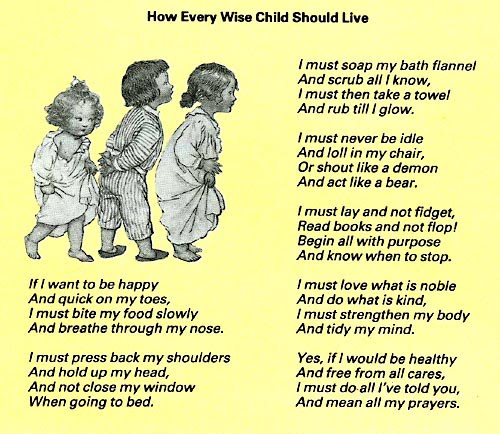
PINK SATURDAY - A CHILD'S PRAYER

I just found this little piece again, and just had to share! (I tore this out of an old magazine and had it in my collage stash).

So perfect...


This gave me the inspiration to have a go at a digital piece - in pink, as it's Pink Saturday. This picture is full sized (so just left-click to open at full size, then right-click to copy):


... and here it is again, as a button (sized to go in a sidebar if anyone would like it - just copy and paste the code into an html box):


This week my Blog Of The Week is Create with TLC: Paulette creates wonderful word art, and this is where I found the little Prayer quotation. The picture is a copryright-free image Tina (Beansie Babbles) sent me, and I thought they made a perfect fit.

Hope you enjoy it!

pink saturday


Finally, don’t forget to visit Beverly at How Sweet the Sound to see all the other wonderful Pink Saturday posts!

Friday, January 29, 2010

PINK SATURDAY POODLE

It's Pink Saturday again, and I'm in a frivolous mood this week!

The eye is tons better; I can tolerate the computer screen, so life is swinging back to normal. I never thought I'd miss my computer so much!


Here's a sweet little dog (Fox Terrier? Poodle?)  I've photoshopped for you, as Valentine's Day is just around the corner. Isn't he hysterical? Those cute little boot button eyes... irresistible!

This one is 220px wide, to fit in a sidebar, if you feel so inclined.

Left-click either picture to bring up to full size, and right-click to copy to your computer. Then just add as a picture in Layout view.

Here's the original picture (copyright free - sorry, I've no idea where I got it from).

Here's my site of the week: Songbird. I really like the background and layout: very calming - and her style. The vignettes are simple, chic and elegant. Enjoy.

Finally, don't forget to visit Beverly's site - How Sweet the Sound - to see the rest of the Pink Saturday posts!

Wednesday, December 16, 2009

NEW CHRISTMAS HEADERS & BACKGROUNDS


I've just designed some new headers and backgrounds with Christmassy & winter themes, if you'd like to look!
Here are the backgrounds
Here are the headers, plus an email button etc


I know some of you love my freebie headers, but aren't all that with the graphics packages - so I'm offering a custom header service for you. This means I'll add your blog name and one line of text to one of my premade freebie headers for a flat fee of $5.00 (I take PayPal) . This is a new idea I'm trying out, to see if there's any demand. Full details here in my sidebar.

Otherwise, check out my Etsy shop for details of my custom blog makeover packages.

Also new on Etsy: my tutorials for Japanese Stab-bound albums (6 variations) and Single Needle Coptic stitch books. End of advert, lol.

Friday, September 25, 2009

HAPPY PINK SATURDAY BLINKIE

I'm very excited - I just created my very first blinkie (with the help of Picasion as I couldn't find the Animation button on Photoshop).


Take this code:

<a href="http://1stfloorflatblogology.blogspot.com/" target="_blank"><img border="0" src="http://i659.photobucket.com/albums/uu313/1stFloorFlatComputery/ee79e342.gif"/></a>

So here it is: especially for you Pink Saturday ladies! 

If you'd like the blinkie for the sidebar of  your blog, just copy the code and paste it into an html box. In Blogger, go to Layouts > Page Elements > Add a Gadget > choose HTML/Java code box, and just paste the code into the box and then Save. That's it!

Hope you like it!


Click this link to visit Beverly's blog How Sweet the Sound to read the rest of the Pink Saturday posts.

Thursday, May 28, 2009

1st FLOORFLAT - THE WEBSITE


I'm a happy bunny - reloaded pix the Caught in Crystal section in Techniques, so you can actually read the pages now, and added a Blog Backgrounds tutorial in The Computery.


Copyright Susie Jefferson

Added to this, I have content on the website now, so there is actually something to look at. Plus a couple of tutorials as well. The advantage with a website being that you don't have to roam all over to look for an item: the pages are pretty much static in that they stay where they are put!

If looking for blog backgrounds, buttons etc on the website, go to Freebies. I'll try to remember to put a link in the Galleries section as well.

It's amazing just how much TIME it all takes, but at least I am happier with the layout now, and the email links work properly (they did from my end, but at the server end they were still directed to the old Unix site). All above my head, which is why I pay the web server guys so they can do it all for me. All I want is they keep the website up there somehow, so people can look at it and send me the occasional comment.

The new screen is amazing - at least I can see what I'm doing now!

Friday, May 8, 2009

THINK PINK!

I've been digitally inclined all week, and decided to do something a little different for this week's post: a blog background and a choice of two headers.

These are free for you to use if you feel so inclined.

2-COLUMN BLOGGER BACKGROUND


Think Pink set
Copyright Susie Jefferson


<style type="text/css">
body {background-image: url("http://i659.photobucket.com/albums/uu313/1stFloorFlatComputery/
9eb8a67e.jpg"); background-position: center; background-repeat: no-repeat; background-attachment: fixed; }
</style>
<div id="tag" style="position:absolute; left:0px; top:50px; z-index:50; width:150px; height:30px;">
<a href="http://1stfloorflat.blogspot.com/" target="_blank">
<img border="0" src="http://i659.photobucket.com/albums/uu313/1stFloorFlatComputery/dd6505d8.png"/>
</a></div>
Copy and paste ALL the code into an html/javacode box via Layouts > Add A Gadget.

THINK PINK HEADER No 1


THINK PINK HEADER No 2


To install the headers, just left-click for the full-sized picture then right-click to copy it to your own hard drive. Go to Layouts and edit your Header> Add image from your computer > show Behind title & description.

Don't forget to go to Layouts > Fonts & Colours to adjust the colours to match your new look.

I hope you like them!


Go here to visit Beverly at How Sweet The Sound and to see all the other Pink Saturday posts!

Friday, May 1, 2009

IT'S PINK SATURDAY AGAIN


I love Pink Saturdays - such a nice day, all happy stuff!

Here's my contribution for today: a quotation and some more blog buttons, if you would like to use them to decorate your own blogs.

Here's the quote:
Some men see things as they are and ask why. Others dream things that never were and ask why not.
George Bernard Shaw
And here are the buttons:

Copy ALL of this code and paste it into an HTML/JavaCode box, then insert your own email address where the three *** are, between the mailto: and the " (no spaces!) for your own email button.


<a href="mailto:***"><img border="0" src="http://i659.photobucket.com/albums/uu313/1stFloorFlatComputery/tn_AllJoysEmail.png"/></a>

If you'd like to take this button to decorate your blog, just go Layout > Page Element > Add A Gadget, then copy the code below and paste it into an HTML/JavaCode box.


<a href="http://1stfloorflat.wordpress.com/"><img border="0" alt="" src="http://i659.photobucket.com/albums/uu313/1stFloorFlatComputery/tn_Pinkwelcome.jpg"><img/></a>

WordPress users go here if you would like a blog button (you need different code for WordPress, so I created another blog specially for you).

And don't forget to visit the other blog I write for: BladeRubber Blog - for the giveaway - as it closes TODAY (winner announced tomorrow). All you have to do is leave a comment on the BladeRubber blog. I'd hate for you to miss out!

Go here to visit Beverly at How Sweet The Sound and to see all the other Pink Saturday posts!

Thursday, April 30, 2009

WHY I LOVE BLOGGING

Why do I love blogging?

To be honest, it's something I resisted for quite a while - couldn't see the point if you had a website. Couldn't imagine what I would want to write about - and couldn't imagine anyone would want to read it, either!

Visit Joy at Cupid's Charm to meet all the other Party goers!

So I thought it might be a kind of depository for bits of artwork, and a vanity thing - just to be fashionable and say I had a blog too. The must-have accessory, kind of thing. For someone who never kept a diary beyond the first week, the person who only ever filled in the address section of her organsier - I never, ever thought I would keep it up (this is my 112th!)

Blogging is addictive - I find myself planning posts when sitting in the bath, or on the bus. I look online for things to share, funny YouTube videos etc. And I find I love to inform, to share, to teach: techniques, how to do things, WHY to do things... and I have fallen in love with the technicalities of blogging - I worked out how to make blog buttons, email buttons ... and now I can't stop.

I love to see how every blog is different: there are only so many templates - but what infinite variety in what the bloggers do within their own environments. I love the blog skins, the colours, the little decorative doodads, widgets, gadgets, buttons and badges... the clothing the blogger dresses up in!

Plus I have made so many friends - people who, if we lived in the same country, would be fun to hang out with and be on the phone with, go shopping with... People who GET IT when I moan about the computer playing up (my husband doesn't even know how to use one). I reckon we're ALL twins separated at birth.

Take this button for your blog, if you would like to:

Go to Layout > Page Elements > Add a Gadget, then copy and paste all the code into an HTML/JavaCode box.


<a href="http://1stfloorflat.blogspot.com/" target="_blank"><img border="0" src="http://i659.photobucket.com/albums/uu313/1stFloorFlatComputery/tn_FrameThanks.png"/></a>

Thanks due to Joy at Cupid's Charm for organising this wonderful Blog Party.

ADDENDUM:
While you are here, visiting my blog (thanks so much) you may also want to whizz over to the BladeRubberStamps Blog very quickly - as there is a great giveaway competition of exclusive free stamps (which I designed myself) which closes TOMORROW (Saturday 2nd May). You might not be aware of this, and I'd hate you to miss out!

Scroll further down this blog to see full details - or go to BladeRubberStamps Blog). All you have to do is leave a comment to win. I will announce the winner on both blogs on Sunday (3rd).

Friday, April 10, 2009

HAPPY PINK SATURDAY

As it's Easter weekend, I thought I would give you something a little different!

Here is a blog button for you to copy into the footer of your blog. Just go to Layouts, scroll to the bottom of the layout page and click on Add A Gadget > add HTML/JavaCode and paste the code into the box. Save, and that's it!


<a href="http://1stfloorflat.blogspot.com/"><img border="0" src="http://i659.photobucket.com/albums/uu313/1stFloorFlatComputery/thanksvisit.jpg"/></a>


And an Easter card (one of my digital collages) which you are free to copy (personal use only, no collage collections).

Copyright Susie Jefferson


Go here to visit Beverly at How Sweet The Sound to all the other Pink Saturday posts!


Tuesday, April 7, 2009

BLOG BUTTONS

I have been messing around with Photoshop and making some blog buttons, which you might like to use.

YOUR OWN EMAIL BUTTON
  1. Go to Layout > Page Elements >Add A Gadget and click on the HTML/JavaScript box.
  2. Copy & paste the code exactly as shown, and substitute your own email address where the red lettering is, in between the " " marks.
  3. DO NOT DELETE the mailto: code, or it won't work.
  4. Click Save and then go and test it!


<a href="mailto:your email address"><img border="0" src="http://i659.photobucket.com/albums/uu313/1stFloorFlatComputery/intouchbutton.jpg"/></a>

If that one isn't your style, how about this one:


<a href="mailto:your email address"><img border="0" src="http://i659.photobucket.com/albums/uu313/1stFloorFlatComputery/e-me.png"/></a>


I'll be putting more buttons on, and they will all be archived onto the Computery page so you can find them easily.

I'll be very interested in feedback on these email buttons: if you like them, I will make more.