It's officially the First Week of Christmas in our household - both Peter (my long-suffering husband) and I adore Christmas! I intend having the tree up and decorated on the 1st December, and will be shopping for tinsel and lights even as we speak...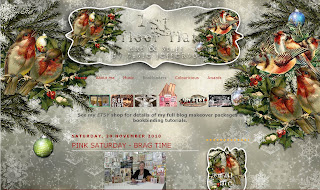 |
| Vintage Robins - copyright Susie Jefferson |
So my first gift to you is this brand new Christmassy background, header and email button set, so get you in the mood. This background will fit any 3-col blog and also a wider 2-col one, plus the new Designer Templates (see
my post as to which will fit the best). Just copy all the code below exactly as you see it, and pop it into an html widget right on your blog.
<style type="text/css">
body {background-image: url("http://i659.photobucket.com/albums/uu313/1stFloorFlatComputery/8227bc5b.jpg"); background-position: center; background-repeat: no-repeat; background-attachment: fixed; }
</style>
<div id="tag" style="position:absolute; left:0px; top:50px; z-index:50; width:150px; height:30px;">
<a href="http://1stfloorflatblogology.blogspot.com/" target="_blank">
<img border="0" src="http://i659.photobucket.com/albums/uu313/1stFloorFlatComputery/9061ddc2.png"/>
</a></div>
WordPress user? Yes, you can use this one as well! Go to Appearance, Background, then Upload Image. For Position, click 'center', for Repeat just click 'no repeat' and for Attachment click 'fixed' and it'll fit most freebie WordPress blogs. Ditto the header and email button - jut add the code as normal.
HEADER |
| Vintage Robins header - copyright Susie Jefferson |
Copy the code below and enter into your Header box, either behind the title if you want to use Blogger's default header and descriptions, or copy to your computer and add your own customised header using your favourite graphics programme.
http://i659.photobucket.com/albums/uu313/1stFloorFlatComputery/cd568a11.png
EMAIL BUTTON The email button is also a png image (so it will show with a clear background).
 |
| Email button - copyright Susie Jefferson |
Just copy the code and paste into an html widget box in your sidebar. Put your own email address where the code says
email me and make sure there aren't any spaces between the
: and the
" or it won't work.
<a href="mailto:emailme"><img border="0" src="http://i659.photobucket.com/albums/uu313/1stFloorFlatComputery/d422aac7.png"/></a>
We're now winging our way to Christmas! Only a couple more weeks! Where did the time go? Last time I turned round, I swear it was only July... mind you, I've been polaxed by flu (in spite of having an injection against it 3 weeks ago - obviously what's going around isn't what they were inoculating against) and still feeling very weak and wimpish.
However, I'm getting somewhat into the holiday spirit, having finally finished a marathon scrapbooking commission - so am having a massive tidy-up, clearing the decks ready for Christmas proper. Tree, lights, camera, action!
This year, I'm determined to take some decent photos of the decorations - I'm tired of looking at everyone else's wonderful photographs and then seeing my pitiful attempts. I have a great new camera (12 mg or whatever) and still can't work out how to use it - I just leave it on automatic yet closeups still end up totally blurry. Ah well...
 Finally, please visit
Beverly at
How Sweet the Sound to see all the other wonderful Pink Saturday posts!


