Showing posts with label PICASA. Show all posts

Sunday, December 11, 2011

BAH HUMBUG - MORE BLOGGER HEADACHE!

Copyright-free image from Tack-o-Rama
A friend contacted me, asking for help as her blog is now only showing one post at a time! What makes it worse is that resetting the number of posts to show on a page didn't work.

Why? Good old Blogger has done it again: they have now introducted autopagination as this article explains. And NO, you can't disable it (I just spent 4 hours trying).

These things do settle down... I had 3 weeks of my Older, Newer and Home buttons not working at the bottom of a page back in the summer, and this righted itself in time. Ditto around 5 weeks of being unable to leave comments. But it's really frustrating when it happens!

I think for my friend things have been made worse because her blog is privately hosted, not a Blogger blog. And I just found out we don't own our own content - Blogger does! Yikes! What with the Picasa scandal (click on Picasa in the labels section of my sidebar if you want to read the rants) I am really getting worried about Blogger again. I love the format, I've even forgiven them for trying to stop us customising the layouts ourselves... but this might just be a step too far.

Copyright-free image from Tack-o-Rama

Over the Christmas holidays I'll be reinvestigating Tumblr and WordPress (again) and will report back.

We really don't need this just now!

Tuesday, October 5, 2010

MORE ON ONLINE PRIVACY & PICASA


I've done a full tutorial on how to reset your Picasa settings to prevent your artwork and images from being pirated (see the post below). In addition to that post, here are a couple of important points:

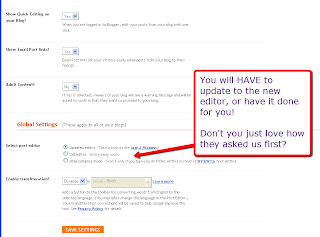
The old editor is being phased out altogether

Many of you are using the old editor, being very happy with Minima - meaning you can swap around your backgrounds for all those freebies out there (including mine on my Blogology page). And you are either nervous of, or plain just don't like the new editor.
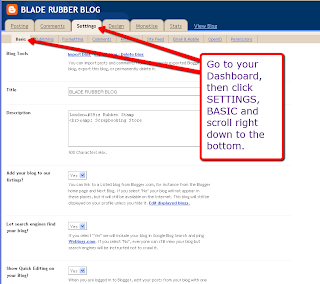
Go to your Dashboard, then click on the Settings tab
Right at the bottom, you'll see this new notice
Guess what? They are now phasing this out altogether!

Does this mean an end to all those blog designers out there? 

I'd say NO, because I've already worked out how to work with the new editor, and also how to embed the code into the html directly. But it will upset things for anyone using a background and unsure of which templates to use.

Happily, I've already done a full tutorial on this which will hopefully guide you through.

Retro images copyright-free from Tack-o-Rama
Well, I'll just delete all my private images off the Picasa album!

Sorry, it isn't that simple! Read on...

Deleting images from Picasa which are also on your blog

A word of warning... if you posted images on your blog: even if you didn't know you had  a Picasa album, you do NOW. So go in and change those settings!

Also, every image you post on your blog (even from old posts) now automically goes into your Picasa album - therefore, if you decide to delete an image, it also gets deleted off your blog! So think carefully before you hit that 'delete' button.

I don't have a Picasa album (I don't think...) so how do I find it?


If you have a Blogger blog, you'll probably have been asked to open a GoogleMail or Gmail account, and this address will most probably be the one you use to access your blog.

Go into your mail account, and you'll see a toolbar right at the very top - click on more to access the drop-down menu.


The first item you'll see is Photos - click on this and you'll be able to access your Picasa album(s) showing every pic you have on your blog, and probably a lot more!

Check my earlier post (below) to see how to adjust your privacy settings.

Even if you don't have a GoogleMail or Gmail account, they are still out to get you! After using the new photo uploader in a couple of new posts, go in and see whether clicking on the Picasa option will bring you to a page showing all the images on your blog. I think you'll find it will!

After your nervous breakdown, go in and reset your privacy settings as mentioned in my earlier post.

I'm repeating this post on Computery, as this needs to get to the widest audience possible.
Saturday, October 2, 2010

PINK SATURDAY - ONLINE PRIVACY & PARANOIA


This week, my post is a tutorial - not very pink - but very important as it's all about our privacy online.

I'm furious! With the new picture uploader (see my post below) Blogger has now linked Picasa and PicNik - and made all our blog images public by default! This means that ANYONE can access YOUR private pictures.

Thanks to Stephanie at Queen of Dreamz, who followed up on my post below and did a little research then emailed me (I'm eternally grateful for this) here's how to change your settings to protect your privacy - which should be the default setting.


Go to your Settings, either via Google or via Picasa. I've gone there by googling for my Picasa album.

Click on Photo Settings and take a look at those defaults!


Tick or untick as you like - read the options CAREFULLY.

Save, and now you have some peace of mind. Now spamming is even more rife than ever, Google should never ever have linked these albums. In my opinion, this is a dreadful invasion of privacy.

pink saturday

And as soon as you've done all that, please visit Beverly at How Sweet the Sound to see all the other wonderful Pink Saturday posts!